

Free up space without the guesswork.
Uncram is a disk cleaner for Mac. It shows what fills your disk, explains every item in plain words and asks before anything moves. Almost everything it cleans can be undone for 7 to 30 days.
For macOS 14 Sonoma or later. Free to download, with Uncram Pro inside the app.
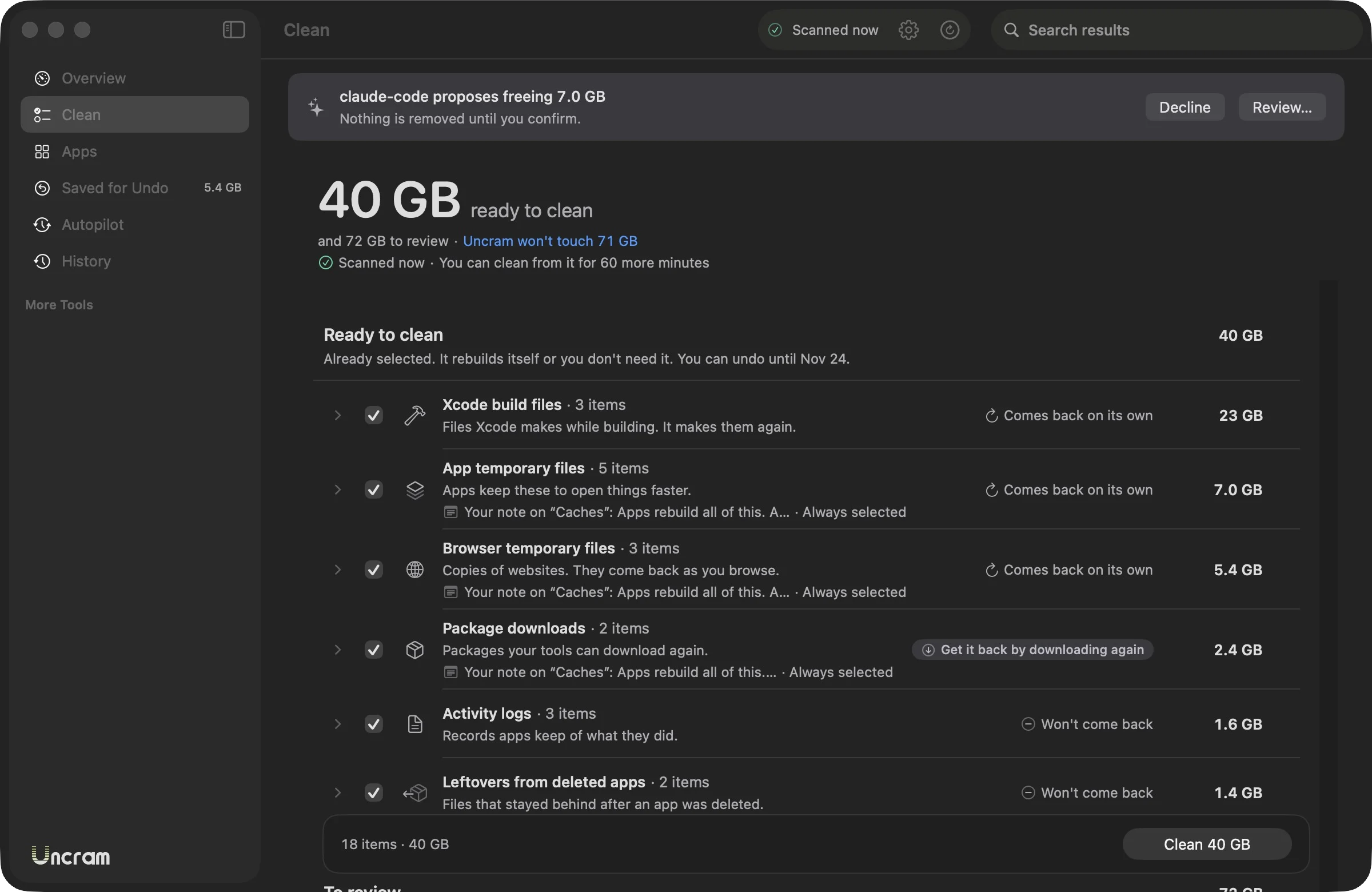
Two clicks to clean
Scan, look, confirm.
Every byte explained
What it is, who made it, what happens if it goes.
Nothing is lost
Put anything back for 7 to 30 days.
Keeps itself tidy
The autopilot cleans what comes back on its own.
Every item comes with an explanation.
Uncram knows 103 kinds of files by name. For each one it tells you who made it, what it does and what happens if it goes. These are its own words.
Xcode build files
SafeMade by Xcode
- What is it?
- Xcode stores the results of building your projects here: compiled code, indexes and previews.
- If you remove it
- The next build of each project takes longer because Xcode compiles it again. Your source code is not touched.
- How to get it back
- Nothing to do: build the project again in Xcode. You can also undo from History.
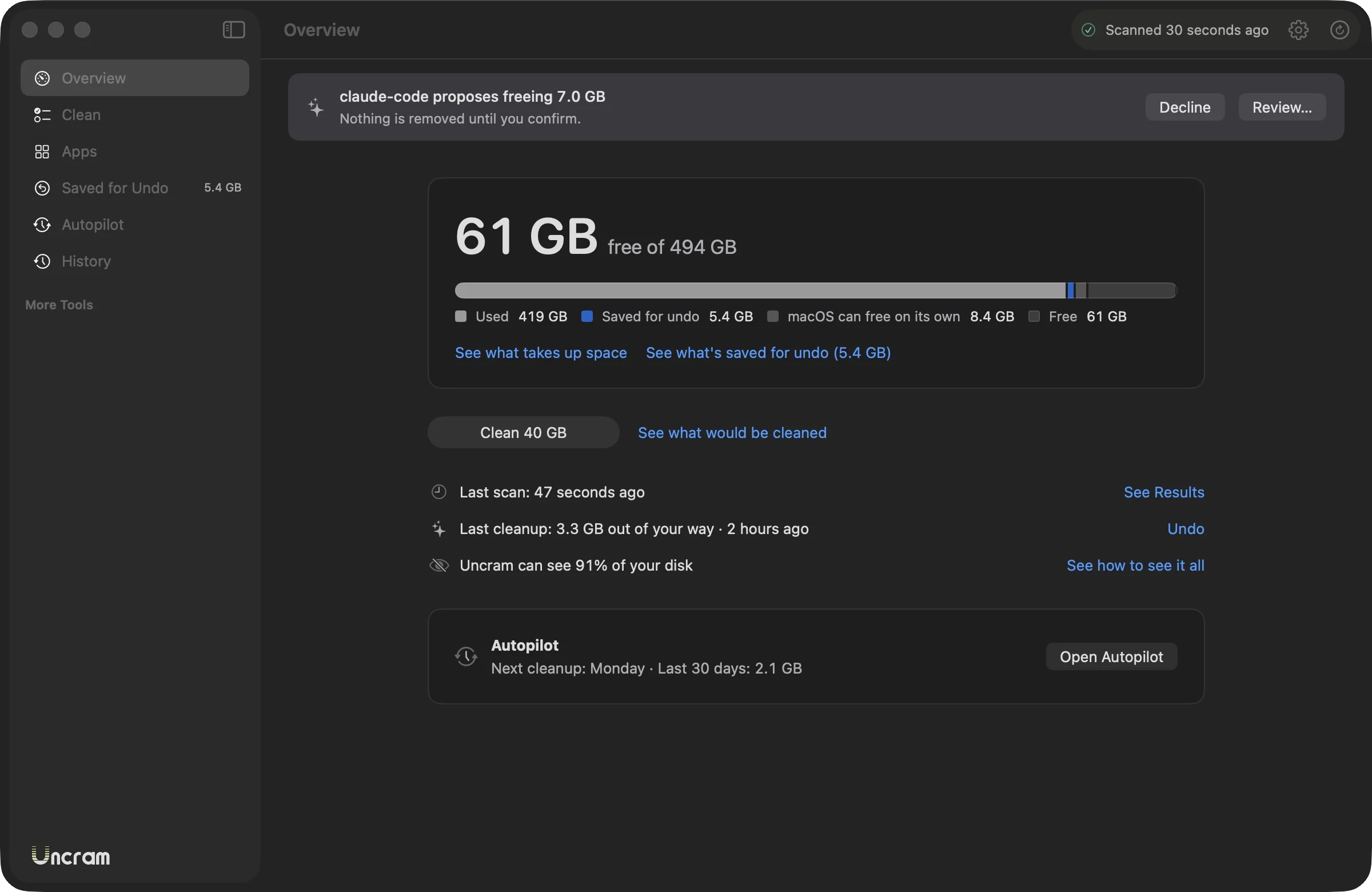
Nothing moves until you say so.
The interface can't delete anything. It can only ask the part of Uncram that cleans, and only with a plan you confirmed in the last ten minutes.
Scan
Uncram measures your home folder. It only reads. A second scan reuses what didn't change and takes a few seconds.
Look
Results come in two groups. Ready to clean is already selected. To review is never selected for you.
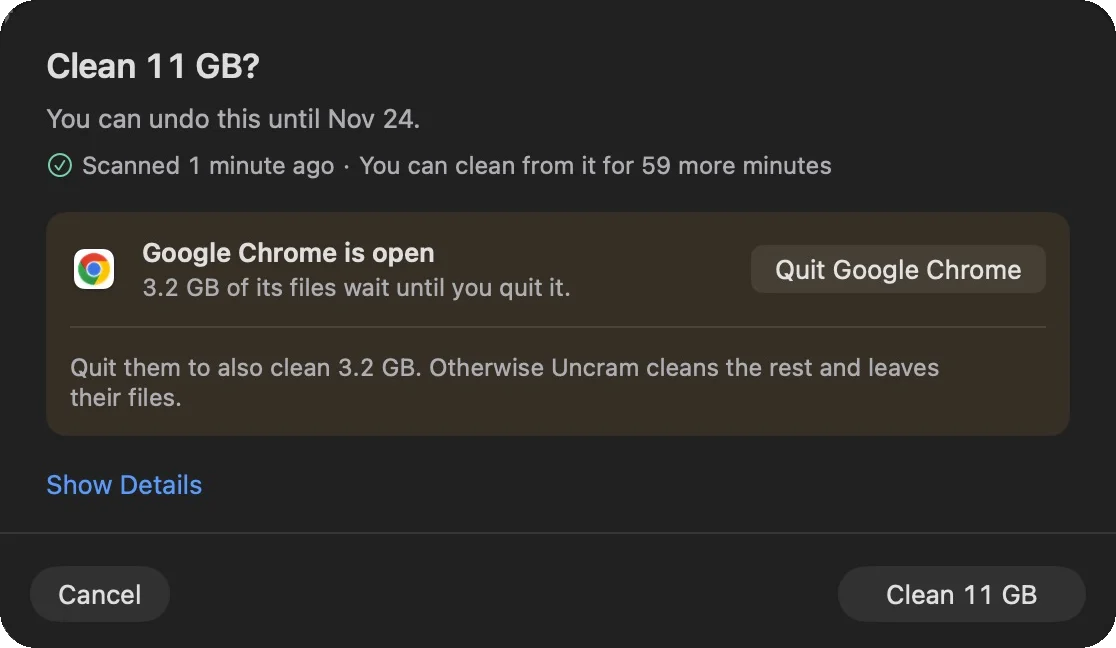
Confirm
One sheet lists what moves and until when you can undo it. Apps that are open keep their files until you quit them.
Undo
Everything goes to a holding area first. Put it back from History, or press Command Z for the last cleanup.
Four ratings. One rule each.
Every item gets one rating before you see it. The rating decides whether it comes selected and how long you can undo it.
- Safe59 kinds
Rebuilds itself or you don't need it.
Already selected. Saved for undo for 7 days.
- Rebuildable30 kinds
Comes back when a tool downloads or builds it again.
Selected in old projects, if you choose the Developer or Creator setup. Saved for undo for 7 days.
- Review14 kinds
It may be yours or still in use.
Never selected for you. Saved for undo for 30 days.
- ProtectedNot counted: never offered
Your files, macOS and anything you asked to keep.
Never offered. Uncram won't touch it.
Changed your mind? Put it back.
Most cleaners delete. Uncram moves what it cleans to a holding area on your Mac and only frees it on the date it showed you.
Day 0
You confirm. Items leave their folders and wait in Uncram.
Day 7
Safe and rebuildable items are freed for good.
Day 30
Items you reviewed are freed for good.
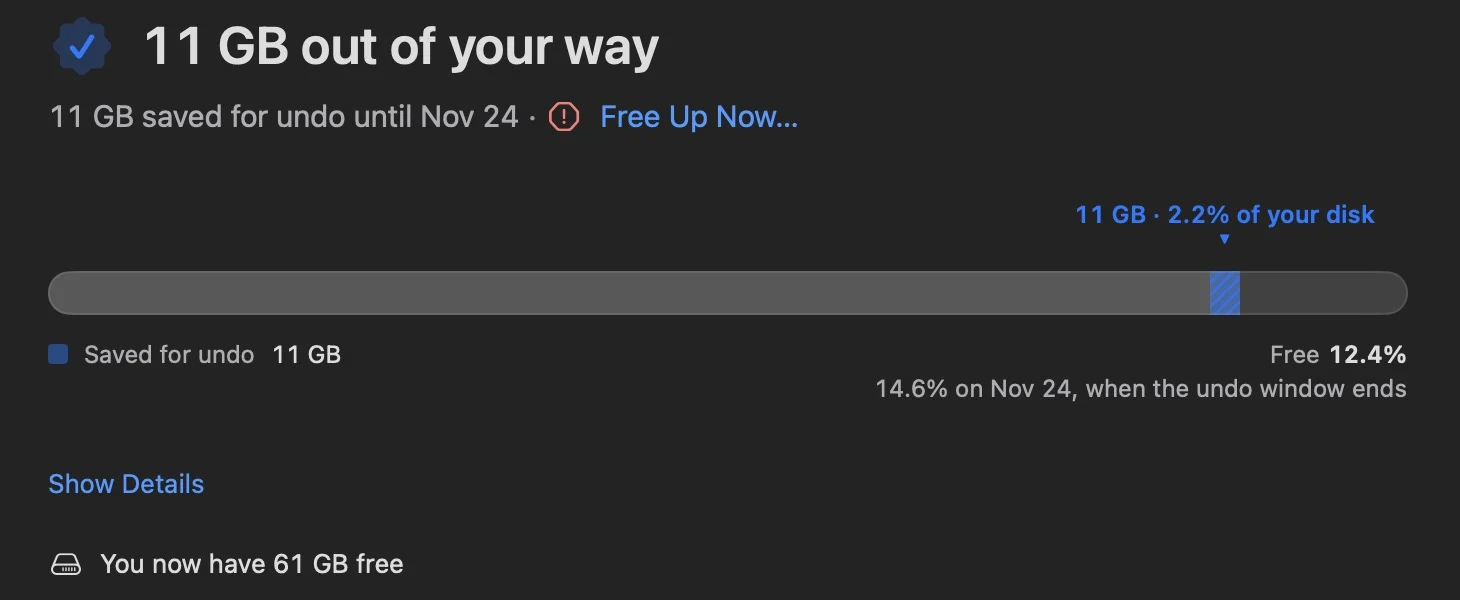
Two figures, never mixed
The receipt says how much was freed now and how much is saved for undo. Space saved for undo still sits on your disk, so Uncram never calls it free.
Need the room today? Free Up Now releases it early, after a second confirmation.
It knows your toolchain.
Build folders, package caches, simulators and AI models are where a developer's disk goes. Uncram names each one and tells you the command that brings it back.
- Xcode
- npm
- pnpm
- Yarn
- Bun
- node-gyp
- Electron
- Playwright
- pip
- uv
- Poetry
- Cargo
- Go
- Gradle
- Maven
- CocoaPods
- Homebrew
- Swift Package Manager
- Deno
- Next.js
- Nuxt
- SvelteKit
- Turborepo
- Parcel
- Angular
- Python
- Swift
- pytest
- mypy
- Ruff
- Hugging Face
- Ollama
- LM Studio
- MacWhisper
Project folders that git tracks are left alone, and nothing is offered while its tool is running.
Cleaning for developersSee where the space went.
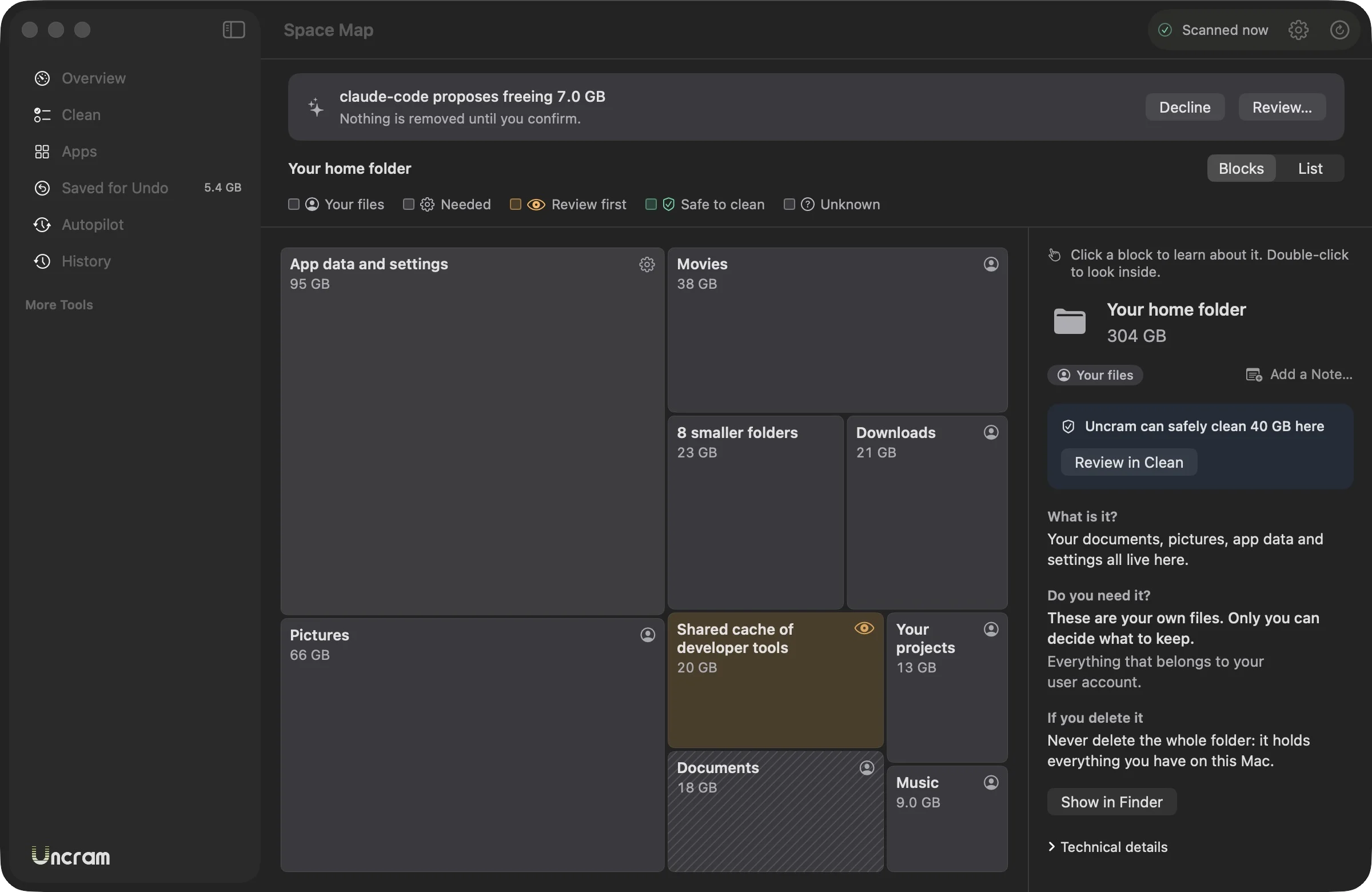
The space map draws your home folder as blocks you can open. Click one to read what it is, whether you need it and what happens if you delete it.
Your AI agent can ask. You decide.
Claude Code, Codex, Cursor and other agents can ask Uncram what fills your disk and propose a cleanup. Nothing is removed until you confirm it in Uncram.
- Off until you turn it on in Settings.
- Two levels: sizes only, or sizes with folder paths.
- Never inside Desktop, Documents, Downloads, Mail, Messages or Photos.
claude mcp add --scope user uncram -- "/Applications/Uncram.app/Contents/Helpers/uncram-mcp"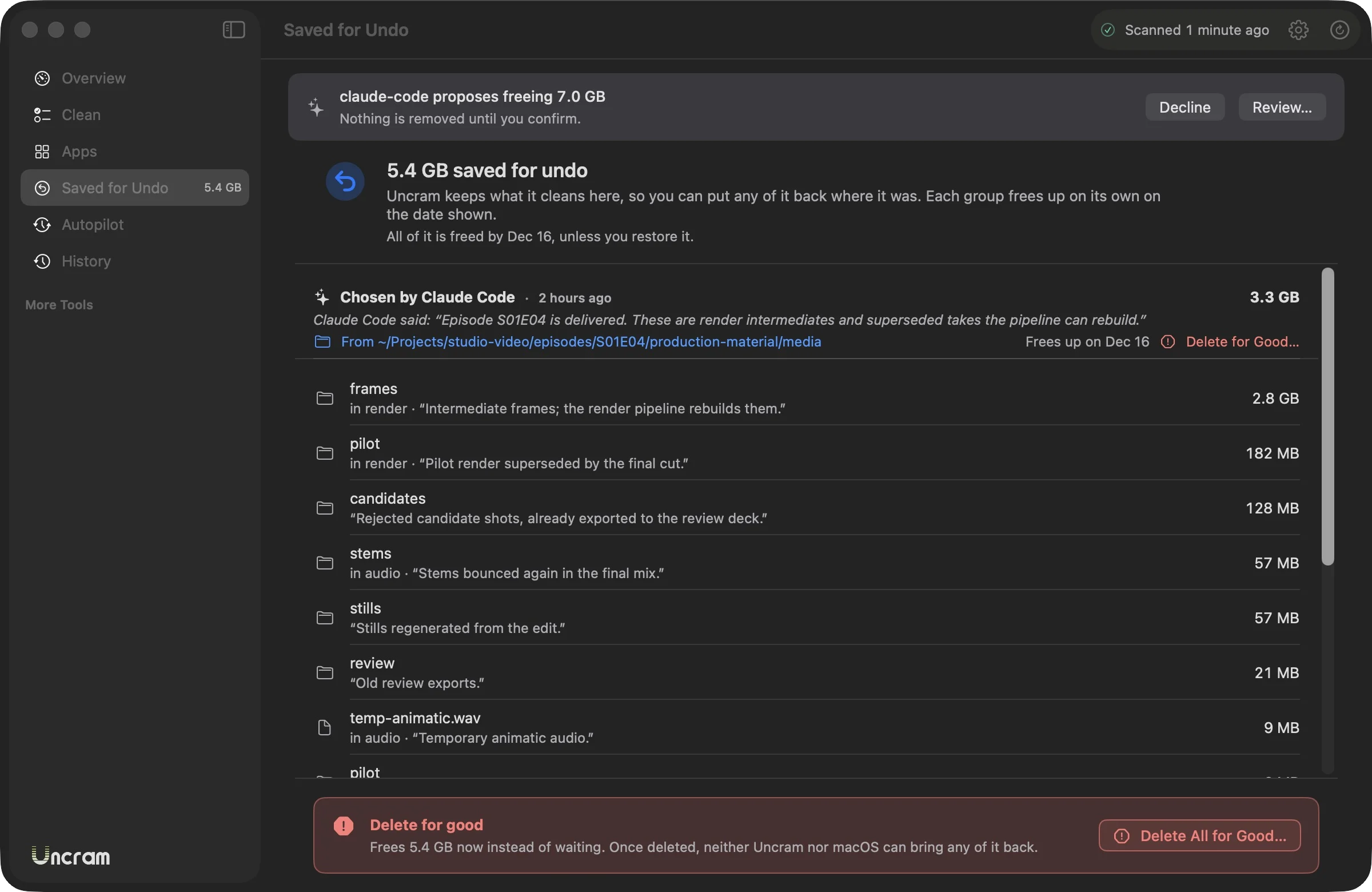
Your files stay on your Mac.
Uncram has no account and no analytics, and it never sends file names or paths anywhere. It runs inside Apple's App Sandbox, without Full Disk Access.
How privacy worksFree stays free.
Scanning, the space map, undo and History never depend on a plan. Uncram Pro removes the monthly limit and adds the tools for developers, creators and AI agents.
Compare Free and ProFree
$0forever
Find out what fills your Mac and clean the everyday files.
- Full scan, space map, History and undo
- Cleans the Trash, app and browser temporary files, logs and old installers
- Up to 10 GB a month, and no limit on your first cleanup
- 3 app uninstalls a month
- The autopilot tells you what it found
Uncram Pro
No monthly limit, and the tools for developers, creators and AI agents.
- Everything in Free, with no monthly limit
- Developer files: Xcode, package caches, build folders, dependencies
- AI models, large and old files, duplicates and similar photos
- Unlimited uninstalls
- The autopilot cleans on its own
- AI agents over MCP
Monthly
$4.99a month
Cancel anytime in your Apple account.
YearlyBest value
$29.99a year
Try it free for 14 days. Family Sharing included.
For Life
$79.99once
Every version of Uncram, no subscription. Family Sharing included.
Every plan covers all the Macs on your Apple Account.
Prices shown for the United States. The App Store shows the price for your country.
Is it safe to delete what Uncram finds?
Uncram only selects items rated Safe: files that rebuild themselves or that you don't need, such as app and browser temporary files. Items that may be yours are rated Review and never selected for you. Even then, almost everything goes to a holding area you can undo for 7 to 30 days.
What happens if I clean something I needed?
Open History or Saved for Undo and choose Put Back. The item returns to where it was. Safe and rebuildable items can be put back for 7 days, items you reviewed for 30. Command Z undoes the last cleanup.
Does Uncram need Full Disk Access?
No. Uncram asks to open your home folder once through a macOS panel and only reads it. macOS may ask before Uncram looks inside Desktop, Documents or Downloads.
What is free and what needs Pro?
Free includes the full scan, the space map, undo and History, and cleans the Trash, temporary files, logs and old installers up to 10 GB a month, with no limit on your first cleanup. Pro removes the limit and adds developer files, AI models, large files, duplicates, similar photos, unlimited uninstalls, the autopilot that cleans on its own and AI agents.
Does Uncram send my data anywhere?
No. Uncram has no account and no analytics, and it never sends file names or paths. It only goes online through Apple's App Store when you open the plans or restore a purchase.
Why is it called Uncram?
To cram is to pack too much into too little space. Uncram does the opposite. The logo shows it: a U of stripes, packed tight at the bottom and opening up toward the top.

Make room. Keep everything.
Download Uncram, run one scan and read what fills your Mac. Nothing moves until you confirm.
For macOS 14 Sonoma or later. Free to download, with Uncram Pro inside the app.