

Disk space for people who build.
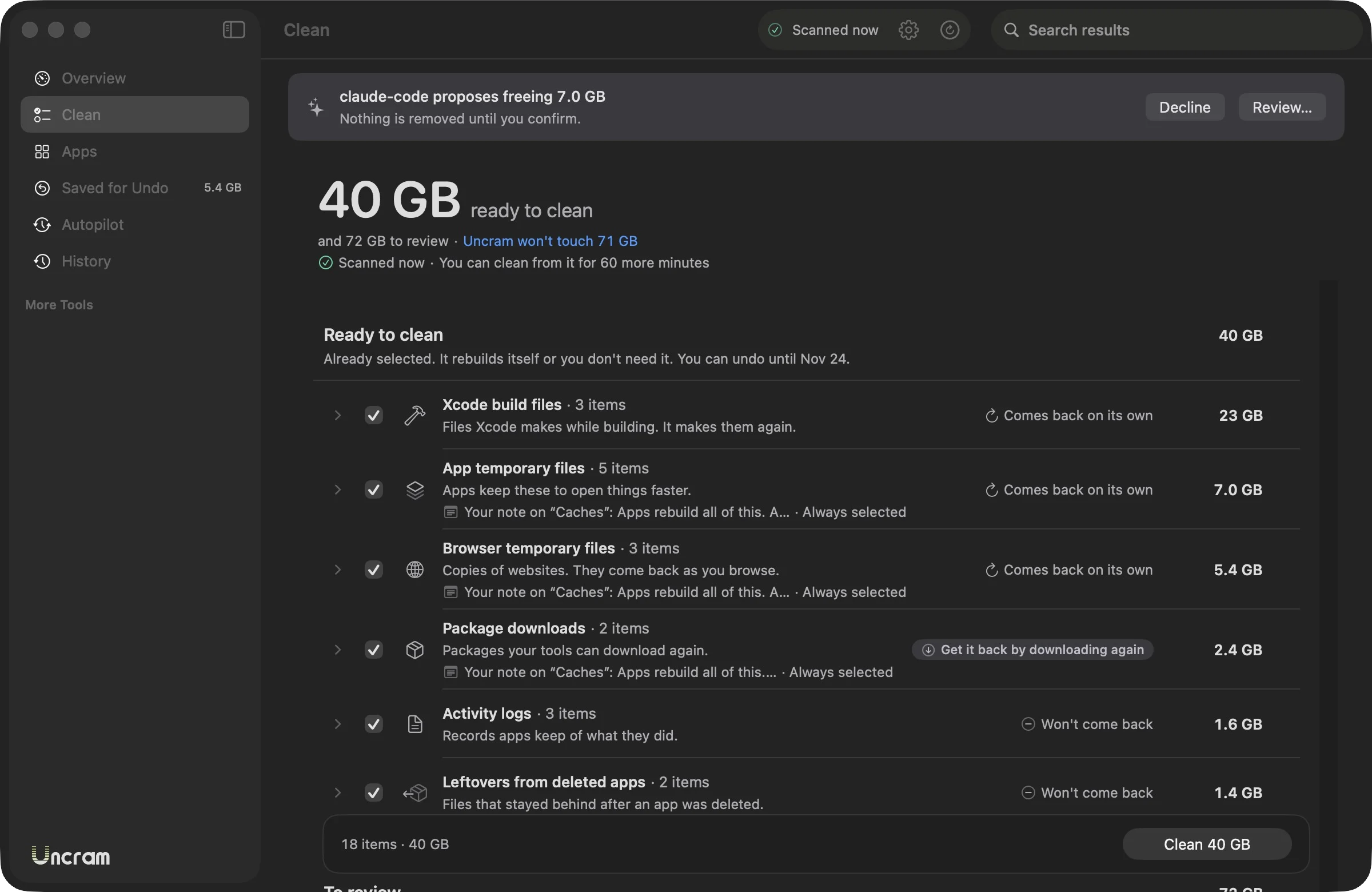
Uncram finds Xcode build files, simulator caches, node_modules, .venv folders, Rust target folders, package caches from npm to Cargo, and local AI models from Hugging Face, Ollama and LM Studio. It tells you the command that rebuilds each one, skips anything git tracks and keeps it all for undo.
Updated
The tools it knows.
Each name is a rule in Uncram's catalog, with its own explanation and restore command.
Xcode build files
| Made by | What is it? | How to get it back | Ratings |
|---|---|---|---|
| Xcode build filesXcode | Xcode stores the results of building your projects here: compiled code, indexes and previews. | Nothing to do: build the project again in Xcode. You can also undo from History. | Safe |
| Xcode app archivesXcode | Each archive is a finished build of an app. Xcode uses them to publish and to read crash reports from released versions. | Undo from History until the release date. After that, archive the project again, which creates a new build. | Review |
| Xcode device symbolsXcode | When you connect a device, Xcode copies its system symbols to debug apps on it. There is one folder per system version. | Nothing to do: connect the device and Xcode copies them again. You can also undo from History. | Rebuildable |
| Xcode device symbolsXcode | When you connect a device, Xcode copies its system symbols to debug apps on it. There is one folder per system version. | Nothing to do: connect the device and Xcode copies them again. You can also undo from History. | Rebuildable |
| Simulator cachesXcode Simulator | The Simulator keeps prepared system data here so simulated devices start quickly. | Nothing to do: the Simulator rebuilds them. You can also undo from History. | Safe |
| Xcode test devicesXcode Simulator | Xcode creates temporary simulated devices to run tests, and leaves them behind afterwards. | Nothing to do: Xcode creates them again. You can also undo from History. | Rebuildable |
| Xcode partial downloadsXcode | Xcode stores the parts of components, such as simulator runtimes, while it downloads them. | Nothing to do: Xcode downloads it again. You can also undo from History. | Rebuildable |
| Xcode and Swift package cachesXcode | Xcode keeps indexes and downloaded information about your projects to open them faster. | Nothing to do: Xcode rebuilds these files. You can also undo from History. | Safe |
Developer package caches
| Made by | What is it? | How to get it back | Ratings |
|---|---|---|---|
| npm downloadsnpm | npm keeps a copy of every package it downloads so installs can run offline. | Nothing to do: npm downloads what it needs again. You can also undo from History. | Safe |
| npm logsnpm | npm writes a log file every time you run a command. They are only useful to find out why something failed. | Nothing to do: npm writes new logs. You can also undo from History. | Safe |
| npx downloadsnpx | npx keeps the command-line tools it ran once so it does not fetch them again. | Nothing to do: npx downloads what it needs again. You can also undo from History. | Rebuildable |
| pnpm package storepnpm | pnpm keeps one copy of each package here and links it into your projects, which saves space. | Run pnpm install in a project to fill the store again, or undo from History until the release date. | Rebuildable |
| pnpm downloadspnpm | pnpm keeps information about available packages here to answer faster. | Nothing to do: pnpm downloads what it needs again. You can also undo from History. | Safe |
| Yarn downloadsYarn | Yarn keeps a copy of every package it downloads so installs are faster. | Nothing to do: Yarn downloads what it needs again. You can also undo from History. | Safe |
| Bun downloadsBun | Bun keeps a copy of every package it downloads so installs are faster. | Nothing to do: Bun downloads what it needs again. You can also undo from History. | Safe |
| node-gyp downloadsnode-gyp | node-gyp keeps the Node.js headers it needs to build native add-ons. | Nothing to do: node-gyp downloads what it needs again. You can also undo from History. | Safe |
| Electron downloadsElectron | Electron-based tools keep the Electron program they downloaded for building apps. | Nothing to do: Electron downloads what it needs again. You can also undo from History. | Safe |
| Playwright test browsersPlaywright | Playwright downloads its own copies of browsers to run automated tests. Each folder is one browser version. | Run npx playwright install to download the browsers again, or undo from History. | Rebuildable |
| pip downloadspip | pip keeps the Python packages it downloaded so it can reinstall them faster. | Nothing to do: pip downloads what it needs again. You can also undo from History. | Safe |
| uv downloadsuv | uv keeps the Python packages it downloaded so installs take seconds. | Nothing to do: uv downloads what it needs again. You can also undo from History. | Safe |
| Poetry downloadsPoetry | Poetry keeps the Python packages it downloaded. Your virtual environments are stored elsewhere. | Nothing to do: Poetry downloads what it needs again. You can also undo from History. | Safe |
| Poetry downloadsPoetry | Poetry keeps the Python packages it downloaded. Your virtual environments are stored elsewhere. | Nothing to do: Poetry downloads what it needs again. You can also undo from History. | Safe |
| Cargo downloadsCargo | Cargo keeps the packaged Rust libraries it downloaded. | Nothing to do: Cargo downloads what it needs again. You can also undo from History. | Safe |
| Go downloadsGo | Go keeps the compiled results of builds so the next build is faster. | Nothing to do: Go rebuilds it. You can also undo from History. | Safe |
| Gradle downloadsGradle | Gradle keeps libraries and build results it downloaded or computed. | Nothing to do: Gradle downloads what it needs again. You can also undo from History. | Rebuildable |
| Gradle downloadsGradle | Gradle keeps libraries and build results it downloaded or computed. | Nothing to do: Gradle downloads what it needs again. You can also undo from History. | Rebuildable |
| Gradle downloadsGradle | Gradle keeps libraries and build results it downloaded or computed. | Nothing to do: Gradle downloads what it needs again. You can also undo from History. | Rebuildable |
| Maven local repositoryMaven | Maven keeps every library it downloads here. It also holds anything you built and installed locally. | Undo from History until the release date. After that, run your Maven build again. | Review |
| CocoaPods downloadsCocoaPods | CocoaPods keeps the iOS libraries it downloaded. | Nothing to do: CocoaPods downloads what it needs again. You can also undo from History. | Safe |
| Homebrew downloadsHomebrew | Homebrew keeps the files it downloaded to install or update tools and apps. | Nothing to do: Homebrew downloads again what it needs. You can also undo from History. | Safe |
| Swift packages downloadsSwift Package Manager | Swift Package Manager keeps the source code of packages it fetched. | Nothing to do: Swift packages downloads what it needs again. You can also undo from History. | Safe |
| Deno downloadsDeno | Deno keeps the remote modules your scripts imported. | Nothing to do: Deno downloads what it needs again. You can also undo from History. | Rebuildable |
Project build files
| Made by | What is it? | How to get it back | Ratings |
|---|---|---|---|
| Next.js build filesNext.js | .next holds files that Next.js generates from your code to run faster. | Nothing to do: start Next.js again. You can also undo from History. | Rebuildable |
| Nuxt build filesNuxt | .nuxt holds files that Nuxt generates from your code to run faster. | Nothing to do: start Nuxt again. You can also undo from History. | Rebuildable |
| SvelteKit build filesSvelteKit | .svelte-kit holds files that SvelteKit generates from your code to run faster. | Nothing to do: start SvelteKit again. You can also undo from History. | Rebuildable |
| Turborepo build filesTurborepo | .turbo holds files that Turborepo generates from your code to run faster. | Nothing to do: start Turborepo again. You can also undo from History. | Rebuildable |
| Parcel build filesParcel | .parcel-cache holds files that Parcel generates from your code to run faster. | Nothing to do: start Parcel again. You can also undo from History. | Rebuildable |
| Angular build filesAngular | .angular holds files that Angular generates from your code to run faster. | Nothing to do: start Angular again. You can also undo from History. | Rebuildable |
| Project output folder (dist)JavaScript | dist usually holds the built version of a project. Sometimes it is the finished result you want to keep or publish. | Run the project's build command (often npm run build), or undo from History until the release date. | Review |
| Rust build files (target)Cargo | Cargo puts everything it compiles in the target folder. It can be several gigabytes. | Run cargo build in the project folder, or undo from History. | Rebuildable |
| Java build files (target)Maven | Maven puts compiled classes and packages in the target folder. | Run mvn package in the project folder, or undo from History. | Rebuildable |
| Gradle project cache (.gradle)Gradle | Gradle keeps information about the project's builds in this folder. | Run ./gradlew build in the project folder, or undo from History. | Rebuildable |
| Gradle build output (build)Gradle | Gradle puts compiled code and packages in the build folder. | Run ./gradlew build in the project folder, or undo from History. | Rebuildable |
| Swift package build files (.build)Swift | Swift puts compiled code and fetched dependencies in the .build folder. | Run swift build in the package folder, or undo from History. | Rebuildable |
| Python compiled files (__pycache__)Python | Python stores a faster version of each module it has run in __pycache__. | Nothing to do: run the tool again. You can also undo from History. | Safe |
| pytest cache (.pytest_cache)pytest | pytest remembers which tests failed last time so it can rerun them first. | Nothing to do: run the tool again. You can also undo from History. | Safe |
| mypy cache (.mypy_cache)mypy | mypy remembers the results of checking your code so the next check is faster. | Nothing to do: run the tool again. You can also undo from History. | Safe |
| Ruff cache (.ruff_cache)Ruff | Ruff remembers which files it already checked so the next run is faster. | Nothing to do: run the tool again. You can also undo from History. | Safe |
Project dependencies
| Made by | What is it? | How to get it back | Ratings |
|---|---|---|---|
| Project dependencies (node_modules)npm | node_modules holds the libraries a project needs. The project's package.json lists them all. | Run npm install (or pnpm, yarn or bun install) in the project folder, or undo from History. | Rebuildable |
| Python environment (.venv)Python | A virtual environment holds the Python and the libraries one project uses. The project lists what it needs in its requirements file. | Create the environment again, for example with uv sync or python -m venv .venv and pip install -r requirements.txt, or undo from History. | Rebuildable |
| Python environment (.venv)Python | A virtual environment holds the Python and the libraries one project uses. The project lists what it needs in its requirements file. | Create the environment again, for example with uv sync or python -m venv .venv and pip install -r requirements.txt, or undo from History. | Rebuildable |
| iOS libraries (Pods)CocoaPods | The Pods folder holds the libraries your Xcode project gets from CocoaPods. The Podfile lists them all. | Run pod install in the project folder, or undo from History. | Rebuildable |
AI models
| Made by | What is it? | How to get it back | Ratings |
|---|---|---|---|
| Chrome on-device AI modelGoogle Chrome | Chrome can download an AI model to run some features on your Mac. It can take several gigabytes. | Nothing to do: Chrome downloads it again if a feature needs it. You can also undo from History. | Rebuildable |
| Hugging Face modelsHugging Face | Python tools download AI models here and reuse them. Each folder is one model and its versions. | Download the model again with hf download, or undo from History until the release date. | Review |
| Hugging Face transfer dataHugging Face | Hugging Face tools keep temporary data here to speed up and resume uploads. | Nothing to do: the tools create it again. You can also undo from History. | Safe |
| Ollama modelsOllama | Ollama stores every model you pulled here. They are large files, often several gigabytes each. | Run ollama pull with the model name, or undo from History until the release date. | Review |
| LM Studio modelsLM Studio | LM Studio stores every model you downloaded here. They are large files, often several gigabytes each. | Download the model again from LM Studio, or undo from History until the release date. | Review |
| MacWhisper transcription modelsMacWhisper | MacWhisper downloads speech recognition models here. You pick which one to use. | Choose the model again in MacWhisper and it downloads, or undo from History. | Rebuildable |
Old projects first.
Choose the Developer setup and rebuildable folders in projects you haven't touched for 30 days come selected. Active projects are shown but left for you to decide.
The Projects screen lists each project with what it can rebuild and its last activity, and selects the ones idle for 60 days in one click.
Your agents keep a diary.
Claude Code, Codex, Gemini and Antigravity keep every conversation on disk. Uncram can trim them to the last days you choose, never touching memory, settings, credentials or Markdown files.
From the terminal.
The uncram command reads status, scans, lists History and undoes. Cleaning from it opens the confirmation sheet in the app.
Let your coding agent propose cleanupsuncram statusuncram scanuncram historyuncram undo
Make room. Keep everything.
Download Uncram, run one scan and read what fills your Mac. Nothing moves until you confirm.
For macOS 14 Sonoma or later. Free to download, with Uncram Pro inside the app.