

How to free up disk space on a Mac
Open System Settings, General, Storage to see what fills your Mac and act on Apple's recommendations. Then clear what rebuilds itself: app and browser caches, old installers in Downloads, leftovers from deleted apps and, if you code, build folders and package caches. Remove only what you can identify, and keep a way back.
Do it by hand.
macOS has its own storage tools. Start there.
- Choose Apple menu, System Settings, General, Storage. On macOS 12 or earlier, choose About This Mac, then Storage.
- Review the recommendations: Store in iCloud, Optimize Storage and Empty Trash Automatically, which removes items that have been in the Trash for more than 30 days.
- Click the info button next to a category, such as Applications or Documents, to review files and delete the ones you don't need.
- Empty the Trash. Space from deleted files only becomes available once the Trash is empty.
- Look in Downloads for disk images (.dmg) and installer packages (.pkg) of apps you already installed.
Do it with Uncram.
- Open Uncram and choose Get Started. Open your home folder in the panel macOS shows.
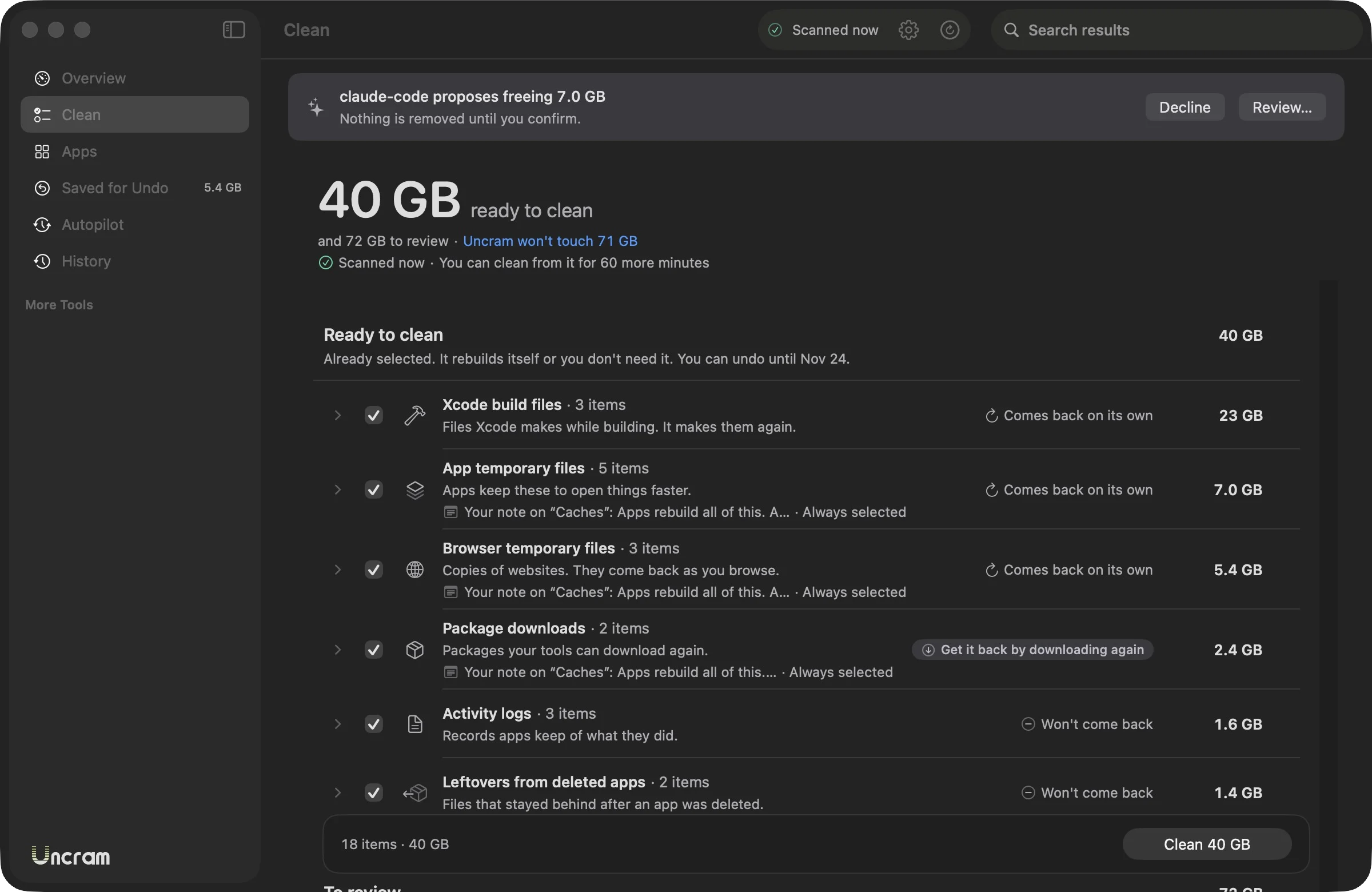
- Read Ready to clean. These items rebuild themselves or you don't need them, and they come selected.
- Look through To review. Nothing there is selected for you; check what you recognize.
- Choose Clean and read the sheet: how much moves and until when you can undo it.
- Keep working. If you miss something, put it back from History for 7 to 30 days.
Questions.
What is System Data on a Mac?
Apple describes it as files that don't fit the other categories, such as logs, caches, virtual machine files and temporary files. You can't select or manage it directly in Storage settings. Part of what Uncram cleans, like app caches and logs in your home folder, counts toward it.
What is purgeable space?
Space macOS can free when it needs it, such as files already stored in iCloud and some caches. You can't remove purgeable files by hand; macOS removes them as space is required.
Is it safe to delete caches on a Mac?
Caches in your home folder are copies apps make to work faster, and apps rebuild them. Deleting the cache of an app that is running can upset it, which is why Uncram skips apps that are open.
How much free space should a Mac have?
Apple doesn't publish one figure. macOS needs room for updates, swap and temporary files, and a nearly full disk makes those slow. Uncram's overview shows free space next to what macOS can free on its own.
Sources
- Apple: Free up storage space on your Mac
- Apple: Optimize storage space on your Mac
- Apple: Find out how storage is used on your Mac
- Apple: Disk Utility, purgeable space
Sources checked on 17 November 2026.

Make room. Keep everything.
Download Uncram, run one scan and read what fills your Mac. Nothing moves until you confirm.
For macOS 14 Sonoma or later. Free to download, with Uncram Pro inside the app.